Does any one know how to get rid of this? it appears each time I change/open aps on my PC


Does any one know how to get rid of this? it appears each time I change/open aps on my PC
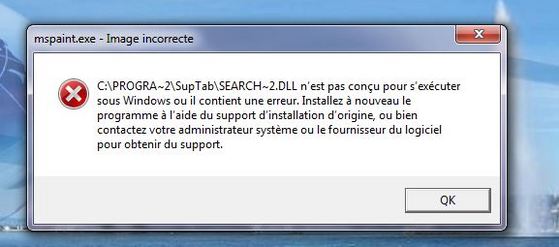
Does any one know how to get rid of this? it appears each time I change/open aps on my PC



Hi Hay
I googled 'mspaint.exe bad image' which brought up some ways to try and get rid of this error. See how you get on.
Cheers
Hi Hay
I googled 'mspaint.exe bad image' which brought up some ways to try and get rid of this error. See how you get on.
Cheers
thank you so much but i don't really find what i need there. the suggested programs either don't exist on my computer or the procedure is beyond my IT skills. i already restored my computer and this bug precisely appeared after a faulty restoration. when trying to restore once again, the suggested dates were too fresh to take me well back in time when things were running smooth... 
thank you so much but i don't really find what i need there. the suggested programs either don't exist on my computer or the procedure is beyond my IT skills. i already restored my computer and this bug precisely appeared after a faulty restoration. when trying to restore once again, the suggested dates were too fresh to take me well back in time when things were running smooth...
Hello. Your paint has been corrupted. there is this missing file that is needed to have it up andrunning again. Best way is to reinstall the program. Or find the misaing file and download.
Hello. Your paint has been corrupted. there is this missing file that is needed to have it up andrunning again. Best way is to reinstall the program. Or find the misaing file and download.
Hello. I am sitting here with my husband, who is a programmer, and has worked with computers all his life. I am going to hand the keyboard to him to let him type some of his thoughts:
I hope I can help with this error. first, I need to understand, do you get this error with more than one program? Or with any random program you try to open? Furthermore, does this error *only* happen when you try to open windows appliations (mspaint, notepad, calculator, command prompt, solitaire, etc), or does it happen when you try to open programs that you have downloaded and installed on your machine as well (internet browsers, games, Word, Powerpoint, etc).
Answering these types of questions will make it easier to help you find a solution.
Lastly, it sounds like you are not doing a full system reset, but rather, "restoring the system" to one of your pre-saved restore points. It is important to understand that (as misleading as the title suggests), that "system restore" doesnt actually restore the system files, it tries to restore to what is essentialy a "snapshot" to the way your system looked at the time the restore point was created, but doesnt touch system files, so if you, or some other program managed to corrupt an important system file, then "system restore" wont help with that.
From what I can see so far, is that one of your system files has been damaged, or one of the required files/drivers for the software you have run has become damanged. this would mean that removing the program from your computer and re-installing the software would fix this issue. If its a system problem, and you are only having issues with default windows software, then I would recommend simply reinstalling the operating system, which is a TRUE system restore. This will get your machine back to the way it was when it was brand new, fresh out of the box. If you choose to go this route, then remember to back up any of your important files, photos, documents before you reinstall.
Hope this helps. Please let me know if you have any questions.
Hello. I am sitting here with my husband, who is a programmer, and has worked with computers all his life. I am going to hand the keyboard to him to let him type some of his thoughts:
I hope I can help with this error. first, I need to understand, do you get this error with more than one program? Or with any random program you try to open? Furthermore, does this error *only* happen when you try to open windows appliations (mspaint, notepad, calculator, command prompt, solitaire, etc), or does it happen when you try to open programs that you have downloaded and installed on your machine as well (internet browsers, games, Word, Powerpoint, etc).
Answering these types of questions will make it easier to help you find a solution.
Lastly, it sounds like you are not doing a full system reset, but rather, "restoring the system" to one of your pre-saved restore points. It is important to understand that (as misleading as the title suggests), that "system restore" doesnt actually restore the system files, it tries to restore to what is essentialy a "snapshot" to the way your system looked at the time the restore point was created, but doesnt touch system files, so if you, or some other program managed to corrupt an important system file, then "system restore" wont help with that.
From what I can see so far, is that one of your system files has been damaged, or one of the required files/drivers for the software you have run has become damanged. this would mean that removing the program from your computer and re-installing the software would fix this issue. If its a system problem, and you are only having issues with default windows software, then I would recommend simply reinstalling the operating system, which is a TRUE system restore. This will get your machine back to the way it was when it was brand new, fresh out of the box. If you choose to go this route, then remember to back up any of your important files, photos, documents before you reinstall.
Hope this helps. Please let me know if you have any questions.
One more thing have you downloaded or installed a program before this appeared. Suptab is an adware. Go to START Menu then coCONTROL PANEL the UNINSTALL PROGRAM then look for Suptab and uninstall it...
One more thing have you downloaded or installed a program before this appeared. Suptab is an adware. Go to START Menu then coCONTROL PANEL the UNINSTALL PROGRAM then look for Suptab and uninstall it...
Dear all, thank you so much for this impressive and extensive feedback :)
I don't have the heart to do a complete systeme restore of my computer, for fear of loosing some precious material. A simple restoration point to better times could have been sufficient but the offered dates were not back enough in time (just 2 weeks)/after the bug appeared.
I have searched my computer for the "Suptab" adware programm as suggested, but my computer is overall malware/adwar/trojan free, but thank you for the suggestion.
Any other "simple solution" is still welcome if you have a magic wand :)
Dear all, thank you so much for this impressive and extensive feedback :)
I don't have the heart to do a complete systeme restore of my computer, for fear of loosing some precious material. A simple restoration point to better times could have been sufficient but the offered dates were not back enough in time (just 2 weeks)/after the bug appeared.
I have searched my computer for the "Suptab" adware programm as suggested, but my computer is overall malware/adwar/trojan free, but thank you for the suggestion.
Any other "simple solution" is still welcome if you have a magic wand :)
Hi,
You can ask David (Zonker - http://www.glocals.com/members/member_profile/27040), he is very skilled.
Have a nice day.
Hi,
You can ask David (Zonker - http://www.glocals.com/members/member_profile/27040), he is very skilled.
Have a nice day.
Hay,
How do you know you are virus/malware/adware free? As the poster said above, you have something "SupTab" which is most likely the culprit.
If you haven't already, download the free version of MBAM (Malwarebytes' Anti-Malware) and run it. I'll bet it finds something.
But, another problem is that running anti-virus/malware on a system which is already infected might not catch the problem, because it hides itself. A better option is to remove your hard disk and attach it to another computer which is known to be clean. *Then* run the MBAM and Anti-virus software.
I can help with this, if you want.
Daivd
Computer Problems? I can help.
+41.79.783.09.90
Hay,
How do you know you are virus/malware/adware free? As the poster said above, you have something "SupTab" which is most likely the culprit.
If you haven't already, download the free version of MBAM (Malwarebytes' Anti-Malware) and run it. I'll bet it finds something.
But, another problem is that running anti-virus/malware on a system which is already infected might not catch the problem, because it hides itself. A better option is to remove your hard disk and attach it to another computer which is known to be clean. *Then* run the MBAM and Anti-virus software.
I can help with this, if you want.
Daivd
Computer Problems? I can help.
+41.79.783.09.90
Hello Zonker. Could she also start it in Safe Mode with networking and install Malwarebytes from there and also manually clean her registry and the associated folders, instead of connecting the hardware to another computer?
Hello Zonker. Could she also start it in Safe Mode with networking and install Malwarebytes from there and also manually clean her registry and the associated folders, instead of connecting the hardware to another computer?
@heavenscent I've had mixed results with that. Sometimes MBAM and other programs won't install or won't run in Safe Mode, but yes, of course, it's worth a try.
To enter Safe Mode, turn the computer off and then on again. *Before* the Windows logo appears (so, almost immediately), quickly and repeatedly press the F8 funciton key until the black screen with white text appears.
At the top of the list of options will be:
Safe Mode
Safe Mode withi Networking
Safe Mode with Command Prompt (or something like that)
Choose "Safe Mode with Networking" as per heavenscent's post above. This is necessary so that if MBAM or anti-virus need to update their databases, they can.
Good luck.
@heavenscent I've had mixed results with that. Sometimes MBAM and other programs won't install or won't run in Safe Mode, but yes, of course, it's worth a try.
To enter Safe Mode, turn the computer off and then on again. *Before* the Windows logo appears (so, almost immediately), quickly and repeatedly press the F8 funciton key until the black screen with white text appears.
At the top of the list of options will be:
Safe Mode
Safe Mode withi Networking
Safe Mode with Command Prompt (or something like that)
Choose "Safe Mode with Networking" as per heavenscent's post above. This is necessary so that if MBAM or anti-virus need to update their databases, they can.
Good luck.
Ok guys, she is looking for an easier solution before anything else, like taking hard drives out and going into safe mode and all that stuff. By what I can tell from the .DLL on the screen shot is that a driver for that particular program seems to be corrupted.
I guess re-installing that program would fix the driver, or if it is a Windows program, then re-installing Windows should do it.
Ok guys, she is looking for an easier solution before anything else, like taking hard drives out and going into safe mode and all that stuff. By what I can tell from the .DLL on the screen shot is that a driver for that particular program seems to be corrupted.
I guess re-installing that program would fix the driver, or if it is a Windows program, then re-installing Windows should do it.
@jean-jacques the problem is that the error message is misleading. I'm sure it has *nothing* to do with the .DLL, which is in fact not at all part of mspaint.
The pathname points to both "SupTab" and "SEARCH~2.DLL" which, in my experience, is an example of malware which has installed a toolbar, a search engine, and things like that which take over your browser, which track your web surfing, or other things like that.
And, "re-installing Windows" is a much more invasive task than removing the disk and scanning it on a clean computer.
@jean-jacques the problem is that the error message is misleading. I'm sure it has *nothing* to do with the .DLL, which is in fact not at all part of mspaint.
The pathname points to both "SupTab" and "SEARCH~2.DLL" which, in my experience, is an example of malware which has installed a toolbar, a search engine, and things like that which take over your browser, which track your web surfing, or other things like that.
And, "re-installing Windows" is a much more invasive task than removing the disk and scanning it on a clean computer.
and keeps you from opening a program, just as what Hay stated.. :)
Does any one know how to get rid of this? it appears each time I change/open aps on my PC "
and keeps you from opening a program, just as what Hay stated.. :)
Does any one know how to get rid of this? it appears each time I change/open aps on my PC "
Perhaps, for the sake of clarity, should I explain what happened exactly:
- i had real problems with Outlook, that i couldnt solve
- some IT gyu came to my house and installed Thunderbird, which was fine
- all of a sudden, after he left, i couldnt watch anything on any player, stream or even youtube without getting a green screen
- the computer got infested with adware/trojan, which i got rid of partially
- i finally resolved to a system restoration (which overeated my computer btw/leaving me to think it was going to die)
- exit the adware/trojan and green screen and welcome to that pop-up, which appreas each time i open or close any ap on my computer, be it windows or not
if any one has a magic wand, a very simple one, because i am no techie....
-
Perhaps, for the sake of clarity, should I explain what happened exactly:
- i had real problems with Outlook, that i couldnt solve
- some IT gyu came to my house and installed Thunderbird, which was fine
- all of a sudden, after he left, i couldnt watch anything on any player, stream or even youtube without getting a green screen
- the computer got infested with adware/trojan, which i got rid of partially
- i finally resolved to a system restoration (which overeated my computer btw/leaving me to think it was going to die)
- exit the adware/trojan and green screen and welcome to that pop-up, which appreas each time i open or close any ap on my computer, be it windows or not
if any one has a magic wand, a very simple one, because i am no techie....
-
I have no magic wand, but I can fix your computer. You have my number.
I have no magic wand, but I can fix your computer. You have my number.
Thank you David, but I need someone who can come at my place.
it is because the adware hasn't been totally eliminated..your machine still has it and it will create new startup key everytime you open your computer. Check the processes in your task manager and see if there is an unfamiliar one..you need a good anti malware software for this problem if you don't know how to do it manually. MBAM is one as Zonker suggested..
it is because the adware hasn't been totally eliminated..your machine still has it and it will create new startup key everytime you open your computer. Check the processes in your task manager and see if there is an unfamiliar one..you need a good anti malware software for this problem if you don't know how to do it manually. MBAM is one as Zonker suggested..
This is not something that I can do "sur place." I'd need to take the laptop so I can work on it. I can come to your place, but if you come to town, we could also meet in a convenient location.
I'll take it, have a look, tell you what I found, and tell you how I think we should proceed. You say "yes" or "no" and I get working.
I can have your computer working in 1-2 days, I know you have had problems for over a month. Wouldn't you like to have the resolved once and for all?
This is not something that I can do "sur place." I'd need to take the laptop so I can work on it. I can come to your place, but if you come to town, we could also meet in a convenient location.
I'll take it, have a look, tell you what I found, and tell you how I think we should proceed. You say "yes" or "no" and I get working.
I can have your computer working in 1-2 days, I know you have had problems for over a month. Wouldn't you like to have the resolved once and for all?
This is not something that I can do "sur place." I'd need to take the laptop so I can work on it. I can come to your place, but if you come to town, we could also meet in a convenient location.
I'll take it, have a look, tell you what I found, and tell you how I think we should proceed. You say "yes" or "no" and I get working.
I can have your computer working in 1-2 days, I know you have had problems for over a month. Wouldn't you like to have the resolved once and for all?
Unfortunately, I cannot part with my computer for more than a couple of hours, as it is my bread and butter.
Unfortunately, I cannot part with my computer for more than a couple of hours, as it is my bread and butter.
I would give it to Zonker otherwise it will become 'toast'!!!
then i'm afraid you'll not be able to fix your computer.
I can prepare a laptop you can borrow while I work on it. What do you need on it? Office? Skype? What else?
then i'm afraid you'll not be able to fix your computer.
I can prepare a laptop you can borrow while I work on it. What do you need on it? Office? Skype? What else?
Sounds like a real mess. I would just erase everything from the hard drive and do a clean re-install. Otherwise there will always be something with it. Good luck!
Sounds like a real mess. I would just erase everything from the hard drive and do a clean re-install. Otherwise there will always be something with it. Good luck!
Hay, if that is the case then the more you should have it repaired by Zonker because it could totally invade your machine and make it unoperable. You'll never know how many trojans could be in there that may corrupt your files or phish for your personal datas...
Hay, if that is the case then the more you should have it repaired by Zonker because it could totally invade your machine and make it unoperable. You'll never know how many trojans could be in there that may corrupt your files or phish for your personal datas...
i would suggest always to make a virtual machine within your computer! It gives more security and you can remove the OS whenever you want without worrying to lose your data!
i would suggest always to make a virtual machine within your computer! It gives more security and you can remove the OS whenever you want without worrying to lose your data!
then i'm afraid you'll not be able to fix your computer.
I can prepare a laptop you can borrow while I work on it. What do you need on it? Office? Skype? What else?
Outlook 2010, Office, Skype, that's it :) but can't live without it!
Well, I don't have a magic wand, but I do have a good hammer in case you don't get to fix it.
But first thing I would do is make a backup of all the important stuff you have.
You didn't mention what version of Windows you have? Is it XP, Vista (hopefully not), 7, or 8?
If you still have the original CD of your Operating System you can run a repair program (which is not a reinstall of the OS). Maybe that will help if you have already cleaned all the viruses from the system and need to repair the corrupted files.
Well, I don't have a magic wand, but I do have a good hammer in case you don't get to fix it.
But first thing I would do is make a backup of all the important stuff you have.
You didn't mention what version of Windows you have? Is it XP, Vista (hopefully not), 7, or 8?
If you still have the original CD of your Operating System you can run a repair program (which is not a reinstall of the OS). Maybe that will help if you have already cleaned all the viruses from the system and need to repair the corrupted files.
If you prefer to totally wipe your hard drive and reinstall the program on your own then don't forget to back up all your files.. It helps that you have another partition dedicated for your files alone.
If you prefer to totally wipe your hard drive and reinstall the program on your own then don't forget to back up all your files.. It helps that you have another partition dedicated for your files alone.
The repair programs don't always work that well. Sometimes they will run for hours and hours and then say "All done. It's been fixed" and you restart and the system doesn't work at all. Or still has the same problems.
Virtual Machines are all well and good, but that is not going to fix the current problem.
I'll see what I can find.
The repair programs don't always work that well. Sometimes they will run for hours and hours and then say "All done. It's been fixed" and you restart and the system doesn't work at all. Or still has the same problems.
Virtual Machines are all well and good, but that is not going to fix the current problem.
I'll see what I can find.
yeah, if you plan to wipe out your hard drive, make 2 partitions so you can keep important data in one, and the operating system in the other.
yeah, if you plan to wipe out your hard drive, make 2 partitions so you can keep important data in one, and the operating system in the other.
Hay if that's all you need then there is no problem with Zonker fixing it for you :)
Hay if that's all you need then there is no problem with Zonker fixing it for you :)
Getting a mac would simplify your life :-)
Getting a mac would simplify your life :-)
until that screws up too...
Well as you need a quick fix, go to: http://www.dll-files.com/
You can download the missing DLL file there and you place it in the folder that is showing on the error message. It is quite possible after that error message is fixed you get another for missing other DLL files. Right now you get the error message for the 1st missing DLL file Windows tries to read, it does not check any further. So if you miss more DLL`s, it`s not a new problem, but one you already had but didn`t know existed.
As your computer could still be infected, the problems might return. Also any activity on your pc is possibly being monitored, such as; emails, webbrowsing, internetbanking.
DLL files are only small parts of entire software programs. Often times, an error message that singles out an individual DLL file is only telling you part of the story. The particular error is often being generated only because it's the first problem the software is encountering, not because it's the single cause of the problem.
When you download and replace a DLL file from a DLL download site, you're often only solving one small part of a larger problem. Usually, the solution to the larger problem is to reinstall the entire software package that the DLL originated from.
Even if replacing a single DLL file fixes your immediate issue, additional problems tend to show up later, often as error messages notifying you of yet another missing DLL file. Save yourself a lot of time and energy and fix the problem right the first time.
Well as you need a quick fix, go to: http://www.dll-files.com/
You can download the missing DLL file there and you place it in the folder that is showing on the error message. It is quite possible after that error message is fixed you get another for missing other DLL files. Right now you get the error message for the 1st missing DLL file Windows tries to read, it does not check any further. So if you miss more DLL`s, it`s not a new problem, but one you already had but didn`t know existed.
As your computer could still be infected, the problems might return. Also any activity on your pc is possibly being monitored, such as; emails, webbrowsing, internetbanking.
DLL files are only small parts of entire software programs. Often times, an error message that singles out an individual DLL file is only telling you part of the story. The particular error is often being generated only because it's the first problem the software is encountering, not because it's the single cause of the problem.
When you download and replace a DLL file from a DLL download site, you're often only solving one small part of a larger problem. Usually, the solution to the larger problem is to reinstall the entire software package that the DLL originated from.
Even if replacing a single DLL file fixes your immediate issue, additional problems tend to show up later, often as error messages notifying you of yet another missing DLL file. Save yourself a lot of time and energy and fix the problem right the first time.
Unfortunately, I cannot part with my computer for more than a couple of hours, as it is my bread and butter.
Hopefully you have learned an important lesson from this: if you depend on computer hardware or software for your business you have to make provision for hardware failure, software failure and data loss. All magnetic media, including hard-drives and thumb-drives, fail at some point (it's "when" not "if") and, as you have found, software is risky too.
Having a single machine containing your only copy of your software and data is guaranteed to land you in trouble at some point.
It sounds like your requirements are quite simple, so just having a second, well-maintained laptop would save you from business interruption.
Mr Zonker is, as always, being very generous with his expert asistance. You should buy a new laptop so you can keep working and let him fix your broken one.
Hopefully you have learned an important lesson from this: if you depend on computer hardware or software for your business you have to make provision for hardware failure, software failure and data loss. All magnetic media, including hard-drives and thumb-drives, fail at some point (it's "when" not "if") and, as you have found, software is risky too.
Having a single machine containing your only copy of your software and data is guaranteed to land you in trouble at some point.
It sounds like your requirements are quite simple, so just having a second, well-maintained laptop would save you from business interruption.
Mr Zonker is, as always, being very generous with his expert asistance. You should buy a new laptop so you can keep working and let him fix your broken one.
She doesn't want to download the .DLL file because it's part of malware. It's *good* that it's not loading. In general, yes, a .DLL replacement woul be a possibly good, temporary fix, but not in this case.
She doesn't want to download the .DLL file because it's part of malware. It's *good* that it's not loading. In general, yes, a .DLL replacement woul be a possibly good, temporary fix, but not in this case.
@Bearded even when a Mac "screws up," it's *soooooo* much easier to recover from it than it is with a Windows computer.
@Bearded even when a Mac "screws up," it's *soooooo* much easier to recover from it than it is with a Windows computer.
I think I need to buy a new computer, and give mine to Zonker for maintanance.
Any suggestion? I use laptops only, I like HP, I multi task, I need something quick and reliable. I need to store all my emails and never really delete them (I often go back to my deleted folder after a while)
I think I need to buy a new computer, and give mine to Zonker for maintanance.
Any suggestion? I use laptops only, I like HP, I multi task, I need something quick and reliable. I need to store all my emails and never really delete them (I often go back to my deleted folder after a while)
Someone from glocals just bought this, but it's a limited time offer.
I think I need to buy a new computer, and give mine to Zonker for maintanance.
Any suggestion? I use laptops only, I like HP, I multi task, I need something quick and reliable. I need to store all my emails and never really delete them (I often go back to my deleted folder after a while)
Laptops are cheaper than they've ever been so I would suggest going for a high spec and good quality, since it's for your business. I can recommend the Asus Zenbook range, as I've had one for a couple of years and it has performed very well.
I would also suggest moving to cloud-based email, e.g. Yahoo or Gmail, so you do not depend on a particular PC to access them and they will not get lost.
While you're at it, get Evernote (www.evernote.com) so that you can keep all of your notes, clippings etc in the cloud and accessible across all your devices (including IOS and Android).
Laptops are cheaper than they've ever been so I would suggest going for a high spec and good quality, since it's for your business. I can recommend the Asus Zenbook range, as I've had one for a couple of years and it has performed very well.
I would also suggest moving to cloud-based email, e.g. Yahoo or Gmail, so you do not depend on a particular PC to access them and they will not get lost.
While you're at it, get Evernote (www.evernote.com) so that you can keep all of your notes, clippings etc in the cloud and accessible across all your devices (including IOS and Android).
Laptops are cheaper than they've ever been so I would suggest going for a high spec and good quality, since it's for your business. I can recommend the Asus Zenbook range, as I've had one for a couple of years and it has performed very well.
I would also suggest moving to cloud-based email, e.g. Yahoo or Gmail, so you do not depend on a particular PC to access them and they will not get lost.
While you're at it, get Evernote (www.evernote.com) so that you can keep all of your notes, clippings etc in the cloud and accessible across all your devices (including IOS and Android).
Thanks for the advise.
2 major points of concern for me:
Asus: I had one and it was incompatible with Skype, that I use daily, and it seemed to be a common problem judging from what I read on many forums while trying to find a solution
Cloud: I have read Big Brother by Orwel, and I wouldn't trust any of my private or business correspondance with any cloud, ever. NSA is everywhere, why hand them all our info on a silver platter?
Thanks for the advise.
2 major points of concern for me:
Asus: I had one and it was incompatible with Skype, that I use daily, and it seemed to be a common problem judging from what I read on many forums while trying to find a solution
Cloud: I have read Big Brother by Orwel, and I wouldn't trust any of my private or business correspondance with any cloud, ever. NSA is everywhere, why hand them all our info on a silver platter?
Thanks for the advise.
2 major points of concern for me:
Asus: I had one and it was incompatible with Skype, that I use daily, and it seemed to be a common problem judging from what I read on many forums while trying to find a solution
Cloud: I have read Big Brother by Orwel, and I wouldn't trust any of my private or business correspondance with any cloud, ever. NSA is everywhere, why hand them all our info on a silver platter?
As far as I know it's Asus tablets that have a problem with Skype, not the laptops, but I have no axe to grind with Asus - it's up to you.
Regarding email and the NSA etc: you are no more less exposed by using Yahoo or Gmail. Your email is already running through someone else's servers, so there's no difference.
As far as I know it's Asus tablets that have a problem with Skype, not the laptops, but I have no axe to grind with Asus - it's up to you.
Regarding email and the NSA etc: you are no more less exposed by using Yahoo or Gmail. Your email is already running through someone else's servers, so there's no difference.
Just a really long response and ..... grrr. sometimes i really hate this forum.
So, quick rewrite:
1. It is absolute nonsense to think/believe that Asus is/was incompatible with Skype. Computers are built with generic parts: CPU, graphics chip, memory, hard disk, audio, wireless, etc. If your computer runs Windows, then Skype will run on it, too. Only a *defect* in the device would cause any problem, but in such a case, it can't be called an incompatibility.
2. I agree with Andy, but here's some more detali.
Imagine you have turned off all your devices that you read mail on and someone sends you an email? Where is it stored? On your email server (after passing through many other severs). When you later (in the morning, for example) get your email, it's downloaded from the server. This is also sometimes called the "Internet" and sometimes called the "Cloud".
Secondly, you told me recently that you have more than one email address and that some are using POP (generally, a bad idea) and some are using IMAP, which keeps your email sync'd (Inbox, Outbox, Drafts, etc.) across multiple devices. This is because all the email is stored on the severs *at all times*.
You've been using the "Cloud" since the first day you got an email address. It just wasn't called that at the time. If you want to avoid Big Brother, you'll need to use pen, paper and stamps. Except, post offices are also run by governments, so that's not fool proof, either.
Anything worthwhile that's been invented can be used for alternate and/or nefarious purposes. But, does that negate the beneficial uses? The advantages? I benefit from the possibilities of Cloud and sync services 100s or 1000s of times per day. I don't think it's a risk, but even if I thought it was, the calculus would still favor the benefits.
You say you like hp computers? For several years, they had *huge* problems with overheating. At the time, I told my clients to avoid hp laptops like the plague. I still tell them of the history if they ask, but temper it with "I don't know for sure, but I'm sure they've addressed those problems since then. But, you should investigate before you buy."
I only say this to point out that, even *if* your Asus had a problem before, doesn't mean they should be condemned forever. Did you know that Asus makes many of the parts that are in many other computers, as well?
Anyway, my $0.02. Well, probably more like $0.25, but whatever.
Just a really long response and ..... grrr. sometimes i really hate this forum.
So, quick rewrite:
1. It is absolute nonsense to think/believe that Asus is/was incompatible with Skype. Computers are built with generic parts: CPU, graphics chip, memory, hard disk, audio, wireless, etc. If your computer runs Windows, then Skype will run on it, too. Only a *defect* in the device would cause any problem, but in such a case, it can't be called an incompatibility.
2. I agree with Andy, but here's some more detali.
Imagine you have turned off all your devices that you read mail on and someone sends you an email? Where is it stored? On your email server (after passing through many other severs). When you later (in the morning, for example) get your email, it's downloaded from the server. This is also sometimes called the "Internet" and sometimes called the "Cloud".
Secondly, you told me recently that you have more than one email address and that some are using POP (generally, a bad idea) and some are using IMAP, which keeps your email sync'd (Inbox, Outbox, Drafts, etc.) across multiple devices. This is because all the email is stored on the severs *at all times*.
You've been using the "Cloud" since the first day you got an email address. It just wasn't called that at the time. If you want to avoid Big Brother, you'll need to use pen, paper and stamps. Except, post offices are also run by governments, so that's not fool proof, either.
Anything worthwhile that's been invented can be used for alternate and/or nefarious purposes. But, does that negate the beneficial uses? The advantages? I benefit from the possibilities of Cloud and sync services 100s or 1000s of times per day. I don't think it's a risk, but even if I thought it was, the calculus would still favor the benefits.
You say you like hp computers? For several years, they had *huge* problems with overheating. At the time, I told my clients to avoid hp laptops like the plague. I still tell them of the history if they ask, but temper it with "I don't know for sure, but I'm sure they've addressed those problems since then. But, you should investigate before you buy."
I only say this to point out that, even *if* your Asus had a problem before, doesn't mean they should be condemned forever. Did you know that Asus makes many of the parts that are in many other computers, as well?
Anyway, my $0.02. Well, probably more like $0.25, but whatever.
(shaking head) just realized mistake in the first line..... I wanted to say:
"I just wrote a really long response and then something happened and it disappeared. Grrrr...."
But, after posting, I see that I dropped some important words which makes it look like I'm upset with this thread/forum. Not so.
(shaking head) just realized mistake in the first line..... I wanted to say:
"I just wrote a really long response and then something happened and it disappeared. Grrrr...."
But, after posting, I see that I dropped some important words which makes it look like I'm upset with this thread/forum. Not so.
Ok. Understood. Not sure though I want to risk buying Asus again but never say never!
As for clouds, I get your point, it makes sense... and it might be the ultimate answer to my email problems.
And lastly, I want to thank all of you for taking the time to answer me, addressing my issues clearly concisely and wisely, providing very good advice, and not turning this thread into a charade :)
Ok. Understood. Not sure though I want to risk buying Asus again but never say never!
As for clouds, I get your point, it makes sense... and it might be the ultimate answer to my email problems.
And lastly, I want to thank all of you for taking the time to answer me, addressing my issues clearly concisely and wisely, providing very good advice, and not turning this thread into a charade :)
I think I need to buy a new computer, and give mine to Zonker for maintanance.
Any suggestion? I use laptops only, I like HP, I multi task, I need something quick and reliable. I need to store all my emails and never really delete them (I often go back to my deleted folder after a while)
Unless your laptop is old (maybe 7 to 10 years old) it would make sense to replace it with a new one since newes machines come with more memory and hard disk capacity. Otherwise, if you want to save money just wipe out the hard drive and re-install the operating system. Your computer would be as good as new.
Unless your laptop is old (maybe 7 to 10 years old) it would make sense to replace it with a new one since newes machines come with more memory and hard disk capacity. Otherwise, if you want to save money just wipe out the hard drive and re-install the operating system. Your computer would be as good as new.
She doesn't want to download the .DLL file because it's part of malware. It's *good* that it's not loading. In general, yes, a .DLL replacement woul be a possibly good, temporary fix, but not in this case.
I'm sure you're right, but I am currently feeling very, very jaded about this product.
I'm sure you're right, but I am currently feeling very, very jaded about this product.
I think I will just buy another laptop, and keep it safe from unwanted "bugs", and give this one, after a complete makeover to my son, who dislikes his Mac almost as much as I hate mine.
I think I will just buy another laptop, and keep it safe from unwanted "bugs", and give this one, after a complete makeover to my son, who dislikes his Mac almost as much as I hate mine.
I'm happy to:
configure the new one so it won't cause you problems,
re-install the current one in the same way
take the Mac off your hands since you both don't like it
let me know
I'm happy to:
configure the new one so it won't cause you problems,
re-install the current one in the same way
take the Mac off your hands since you both don't like it
let me know