Hi,
How can I remove from my computer the bing.com page and put back the google as a main browser? Very annoying ...
Thx


Hi,
How can I remove from my computer the bing.com page and put back the google as a main browser? Very annoying ...
Thx
Hi,
How can I remove from my computer the bing.com page and put back the google as a main browser? Very annoying ...
Thx



Hi, you can remove it from your browser list of search engines. The settings depends on which browser you are using. Remove it also the software if it is installed under add/remove programs.
Hi, you can remove it from your browser list of search engines. The settings depends on which browser you are using. Remove it also the software if it is installed under add/remove programs.
this one is not on the program list where i can uninstall them, and i tried to put google as a main page when i open a window but doesnt work...
this one is not on the program list where i can uninstall them, and i tried to put google as a main page when i open a window but doesnt work...
hi, which operating system and browser you are using?
i have windows 8, and i use chrome.
long time ago i used the bing-translator... maybe this is how it came
i have windows 8, and i use chrome.
long time ago i used the bing-translator... maybe this is how it came
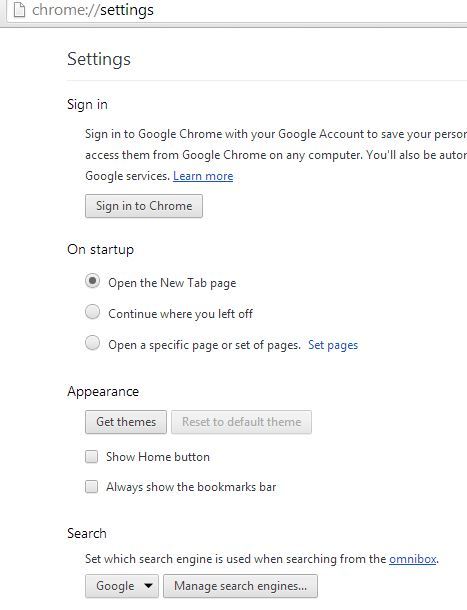
in chrome you have the settings (represented by 3 lines on top right) from there you will see the "search", click "manage search engine". you can remove from there the bing.
or type on url chrome://settings/
attached is the screen shot.
check also the "on startup" you can set the default page every time you open chrome. if you have a hard time finding it send a reply to my email [email protected] and I will send you a short screen capture video.
in chrome you have the settings (represented by 3 lines on top right) from there you will see the "search", click "manage search engine". you can remove from there the bing.
or type on url chrome://settings/
attached is the screen shot.
check also the "on startup" you can set the default page every time you open chrome. if you have a hard time finding it send a reply to my email [email protected] and I will send you a short screen capture video.
yesss! it works! thank you so much! :D
you are welcome. it is my pleasure to help